A clearer view of the requirements behind the work.
Federal regulations and agency direction, connected with technical guidance and industry practices. Find a starting basis, investigate overlapping requirements and revisit what changed, with the source context close at hand.
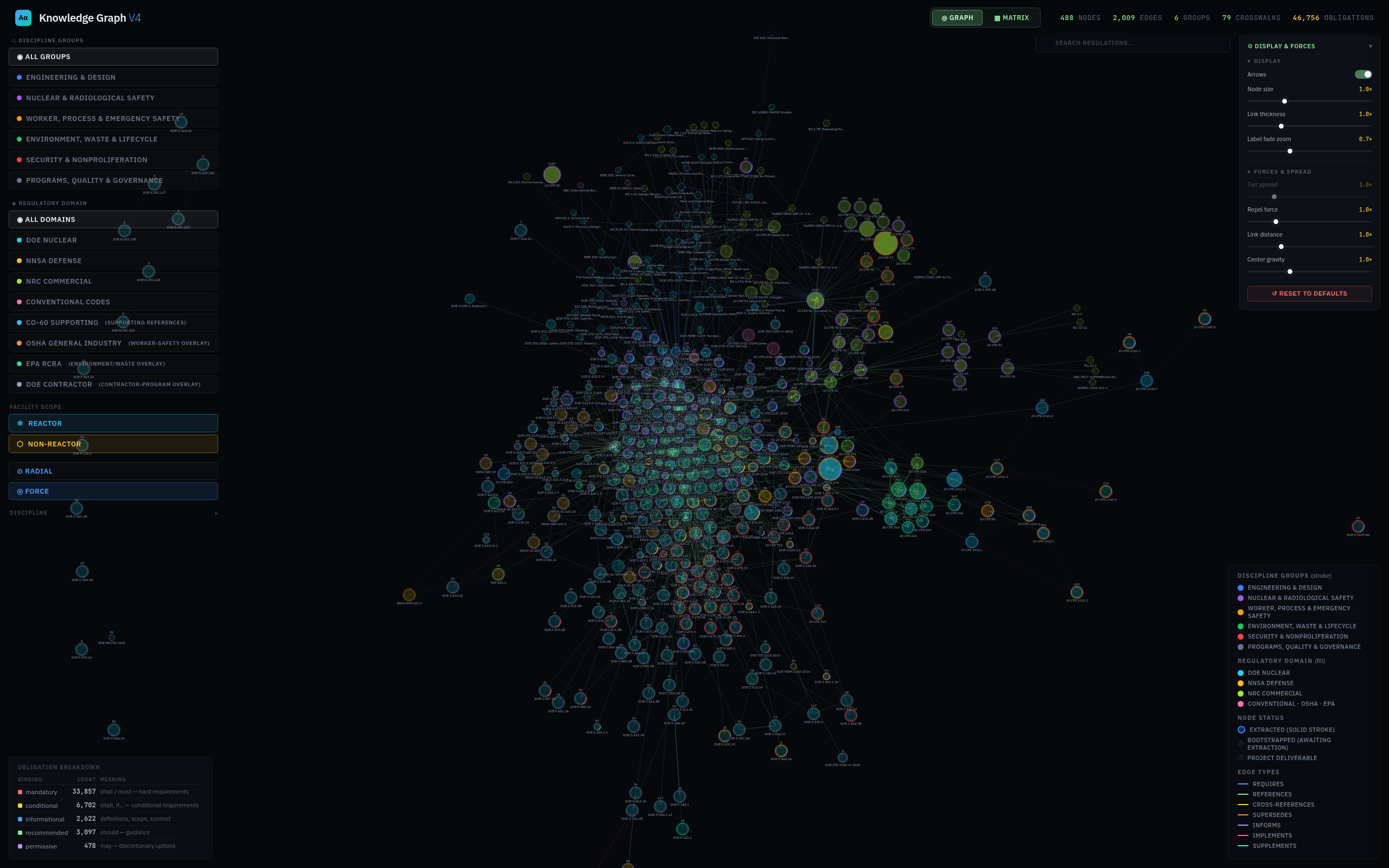
Repository snapshots reviewed September 2026. Extraction covers 382 documents; the document map includes additional references. Review status varies by source. The application screenshot uses a separate saved summary of 46,756 obligation records.
WHAT THIS MEANS FOR YOUR TEAM
Put the requirements to work.
A new project. Two sources that seem to disagree. A revision after the review has started. Ledger gives the team a structured place to investigate and prepare its next decision.
01
“Where do we start on this project?”
Narrow the collection to the work in front of you. Inspect candidate requirements, assumptions and recorded project-basis decisions together, so the review begins with a traceable starting point.
Working scopes · Project-basis review · Source references
02
“These requirements seem to disagree.”
Compare source profiles and examine candidate overlaps or contradictions side by side. Give discipline SMEs the source context they need to distinguish a real conflict from different scope or conditions.
Document comparison · Overlap explorer · Contradiction candidates
03
“What changed since our last review?”
Revisit a saved working scope against the current collection. See records that changed, entered or left the scope and investigate the items that may warrant another look.
Frozen working scopes · Scope drift · Change watch
04
“Who else needs to be in this review?”
Explore obligation candidates that span documents and disciplines. Bring engineering, radiation protection, environmental and waste specialists into the same discussion when the source context points across those interfaces.
Discipline interfaces · Related obligations · Document connections
05
“How do I keep my review organized?”
Save useful searches, bookmark obligations and add personal notes or follow-up states. Return to the questions and source records you were working through.
Personal workspaces · Bookmarks · Review notes
06
“What can we bring to the review meeting?”
Prepare a scoped dossier, checklist or brief for internal review. Supported Markdown, CSV and JSON outputs retain source context and review standing, helping the team carry its investigation into the next discussion.
Scoped exports · Review artifacts · Provenance
Ledger organizes the investigation. Designated reviewers determine applicability, resolve interpretations and approve the project basis.
INSIDE LEDGER
From regulation to design practice.
One DOE example, following a connected source trail from 10 CFR 830 to a facility-safety order and a technical standard. Start with the full map, then follow each highlighted source and its neighboring documents. Pause anywhere to look closer.
The big picture. A document-level overview of Ledger’s source landscape. Each source document has a node; individual requirements and their connections form the deeper layers.
A connected DOE exampleOverview → Regulation → Order → Standard
OverviewStart with the document landscape.
The map opens into each source’s summary, including its requirement counts and discipline breakdown. The silent video repeats; pause to read or open full screen for a closer look.
Actual application views in Force layout. This example uses the viewer’s saved DOE O 420.1C snapshot; DOE O 420.1D is the later revision. The order’s reference to DOE-STD-1189 supplies the second connection. Which revisions and requirements govern a project is determined through its basis review.
View the complete document map ↗ · This summary has 474 source-document nodes and 14 project-deliverable nodes; it is not the master obligation-level knowledge graph. Mapped references do not imply extraction of every publication.
WHAT YOU ARE LOOKING AT
Navigate the sources.
Discipline, regulatory domain and facility-scope controls provide different ways into the document landscape.
Understand what is behind them.
The viewer distinguishes extracted sources from references awaiting extraction. Individual obligation records and their detailed relationships are explored separately from this document-level map.
A SIMPLER WAY TO EXPLORE
See how the work connects.
Use this simplified, interactive overview to explore source families and discipline groups. It summarizes recorded relationships rather than reproducing the application view above.
Select a group to follow its connections
Grouped document connections
Source families group the document map. Every recorded connection between these source families is shown. Cluster size and line width indicate broad volume bands, not engineering importance.
THE WORK BENEATH THE MAP
From source material to usable regulatory intelligence.
The value is in the detail: what a provision says, who it concerns, when it matters and where it came from.
01 / DISTILL
Make the obligation explicit.
For source material authorized for this use, organize provisions into records that retain the action, actor, conditions and source reference. Industry practices provide context and references, rather than extracted consensus-code requirements.
ActionActorConditionsSource reference
02 / CONNECT
Keep the wider context.
Organize the material across documents, disciplines and lifecycle context. Explore references and related requirements without losing sight of the originating provision.
DocumentsDisciplinesLifecycleRelationships
03 / EXAMINE
Bring the basis into the review.
Search, inspect and assemble a draft regulatory basis. Keep source support, review status and open questions visible as the team works toward a decision.
Source supportReview statusProject basis
EXPLORE LEDGER WITH US
Bring a real question. See the depth behind the map.
A private demonstration can follow the sources, obligations and relationships relevant to your work. Start with a project, a discipline or a regulatory question, and we can explore the fit together.